Building a Production-Grade 3-Tier Application on Kubernetes: A Complete DevOps Guide
A hands-on walkthrough of deploying a Trello-style project management app using FastAPI, React, PostgreSQL, Docker, Kubernetes (DOKS), Cilium Gateway API, Jenkins CI/CD, Horizontal Pod Autoscaling, and SSL/TLS with cert-manager on DigitalOcean.
Table of Contents
Project Overview
TaskFlow is a Trello-style project management application built to demonstrate real-world, production-grade DevOps practices. It's not a toy app — it has:
Full JWT-based authentication
Boards, Lists, Cards with drag-and-drop
Card priorities, due dates, and comments
Per-resource ownership checks
Health/readiness probes for Kubernetes
Zero-downtime deployments via rolling updates
SSL/TLS certificate auto-provisioned and auto-renewed via cert-manager
GitHub Repository: https://github.com/shubzz-t/TaskFlow-3_Tier
Architecture
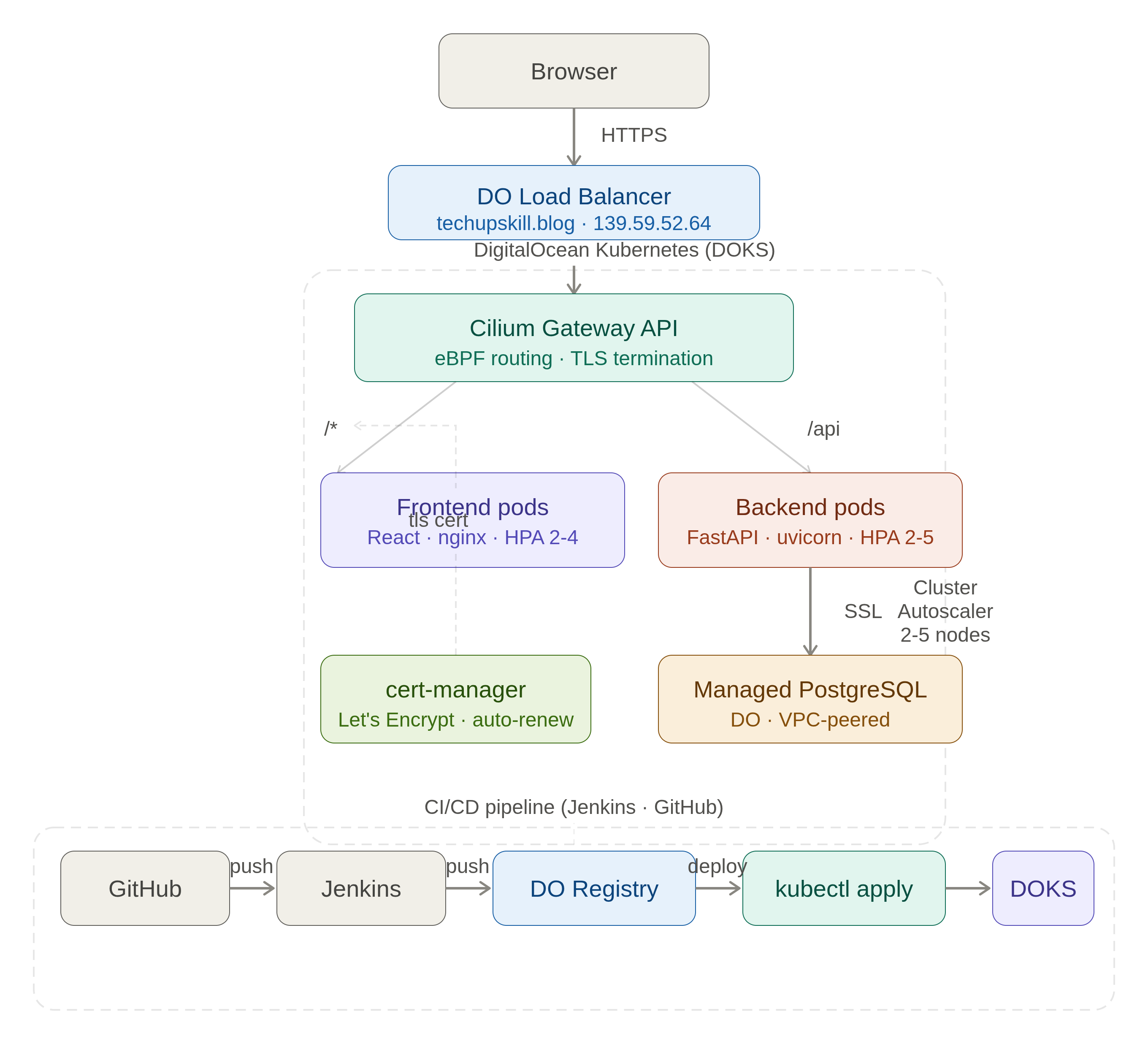
Developer pushes code to GitHub
           │
           ▼ (webhook triggers Jenkins)
    Jenkins Pipeline
    ├── Test → Build → Push to DOCR → Deploy
           │
           ▼
    Internet Traffic
           │
           ▼
    DO Load Balancer (techupskill.blog)
           │  port 80  → HTTP→HTTPS redirect (301)
           │  port 443 → TLS terminated at Gateway (cert-manager issued cert)
           ▼
    Cilium Gateway API (eBPF-based routing, no userspace proxy)
           │
           ├── /api/* ──► FastAPI Backend Pods (HPA: 2-5 replicas)
           │                      │
           │                      ▼
           │              DO Managed PostgreSQL
           │              (VPC-peered, SSL required)
           │
           └── /* ────► nginx Frontend Pods (HPA: 2-4 replicas)
                        (React SPA with drag-and-drop)

    Cluster Autoscaler: adds/removes nodes (min 2, max 5)
    cert-manager: auto-provisions and renews Let's Encrypt certificates
Tech Stack
| Layer | Technology | Why |
|---|---|---|
| Frontend | React (Vite) + @dnd-kit | Modern, component-based, drag-drop native |
| Backend | FastAPI (Python) | Async, auto-docs, Pydantic validation |
| Database | PostgreSQL | ACID compliance, relational integrity |
| ORM | SQLAlchemy 2.0 | Type-safe, production-ready |
| Auth | JWT (python-jose + passlib/bcrypt) | Stateless, scalable |
| Containerization | Docker (multi-stage builds) | Smaller images, faster deploys |
| Registry | DigitalOcean Container Registry | Private, integrated with DOKS |
| Orchestration | Kubernetes (DOKS) | Self-healing, declarative, scalable |
| Traffic Routing | Gateway API (Cilium/eBPF) | Kernel-level routing, no userspace proxy |
| SSL/TLS | cert-manager + Let's Encrypt | Auto-provisioned, auto-renewed |
| CI/CD | Jenkins | Pipeline as code, fully automated |
| Autoscaling | HPA + Cluster Autoscaler | Pod + node level scaling |
| Cloud | DigitalOcean | Managed K8s, managed DB, simple pricing |
Phase 1: Building the Application
Backend — FastAPI
The backend follows a clean separation of concerns:
backend/
└── app/
    ├── main.py           # FastAPI app, middleware, router registration
    ├── core/
    │   ├── config.py     # Pydantic settings (reads from env vars)
    │   ├── security.py   # JWT creation/validation, password hashing
    │   └── deps.py       # get_current_user dependency
    ├── db/
    │   └── session.py    # SQLAlchemy engine + session factory
    ├── models/           # SQLAlchemy ORM models (DB tables)
    ├── schemas/          # Pydantic schemas (request/response validation)
    └── routers/          # FastAPI route handlers
        ├── auth.py       # register, login
        ├── boards.py     # CRUD for boards
        ├── task_lists.py # CRUD for lists (nested under boards)
        ├── cards.py      # CRUD for cards + move between lists
        ├── comments.py   # Comments on cards
        └── health.py     # /healthz and /readyz for K8s probes
Frontend — React
frontend/src/
├── api/           # All HTTP calls (axios + JWT interceptor)
├── context/       # AuthContext (global login state)
├── pages/         # Login, Register, Boards, BoardDetail
├── components/    # Card (draggable), List (droppable), ProtectedRoute
└── styles.css     # Custom design system
Running locally
# Start Postgres
docker run --name taskflow-postgres \
  -e POSTGRES_USER=taskflow \
  -e POSTGRES_PASSWORD=taskflow \
  -e POSTGRES_DB=taskflow \
  -p 5432:5432 -d postgres:16

# Backend
cd backend
python3 -m venv venv && source venv/bin/activate
pip install -r requirements.txt
cp .env.example .env
python3 -c "from app.db.session import Base, engine; from app.models import *; Base.metadata.create_all(bind=engine)"
uvicorn app.main:app --reload
# API docs: http://localhost:8000/docs

# Frontend
cd frontend
npm install && npm run dev
# App: http://localhost:5173
Phase 2: Dockerizing the Application
Why multi-stage builds?
A single-stage Python Dockerfile would include gcc, libpq-dev, and all build tools in the final image — bloating it to ~500MB. Multi-stage builds leave all of that behind.
Backend Dockerfile:
# Stage 1: builder — installs deps (has gcc, build tools)
FROM python:3.12-slim AS builder
RUN apt-get install -y gcc libpq-dev
COPY requirements.txt .
RUN pip install --prefix=/install -r requirements.txt

# Stage 2: runtime — only compiled packages, no build tools
FROM python:3.12-slim AS runtime
RUN apt-get install -y libpq5
COPY --from=builder /install /usr/local
COPY app ./app
RUN useradd --create-home appuser
USER appuser   # never run as root in production
EXPOSE 8000
CMD ["uvicorn", "app.main:app", "--host", "0.0.0.0", "--port", "8000"]
Result: ~180MB instead of ~500MB — 3x smaller, faster pulls, smaller attack surface.
Frontend Dockerfile:
# Stage 1: build — compiles React to static HTML/CSS/JS
FROM node:20-alpine AS build
COPY package*.json ./
RUN npm install
COPY . .
RUN npm run build

# Stage 2: serve — nginx serves static files, no Node.js needed
FROM nginx:1.27-alpine AS runtime
COPY --from=build /app/dist /usr/share/nginx/html
COPY nginx.conf /etc/nginx/conf.d/default.conf
Key nginx config — the SPA fallback:
location / {
    try_files $uri $uri/ /index.html;
    # Without this, refreshing /boards/123 returns 404
    # React Router handles routing client-side after index.html loads
}
Testing containers locally
docker network create taskflow-net

docker run --name taskflow-postgres --network taskflow-net \
  -e POSTGRES_USER=taskflow -e POSTGRES_PASSWORD=taskflow \
  -e POSTGRES_DB=taskflow -p 5432:5432 -d postgres:16

docker run --name taskflow-backend --network taskflow-net \
  -e DATABASE_URL="postgresql+psycopg2://taskflow:taskflow@taskflow-postgres:5432/taskflow" \
  -e SECRET_KEY="your-secret-key" \
  -p 8000:8000 -d taskflow-backend:local

docker run --name taskflow-frontend --network taskflow-net \
  -p 8080:80 -d taskflow-frontend:local
Why container names instead of localhost? Each container has its own network namespace.
localhostinside a container means "myself". Shared Docker networks enable DNS resolution by container name.
Phase 3: Pushing to GitHub
cd ~/projects/taskflow
git init
git add .
git status  # verify .env is NOT listed
git commit -m "feat: initial TaskFlow application"
git remote add origin https://github.com/shubzz-t/TaskFlow-3_Tier.git
git branch -M main
git push -u origin main
Critical .gitignore rules:
.env
*/.env
backend/venv/
frontend/node_modules/
k8s/secrets.yaml    # Never commit K8s secrets
Phase 4: DigitalOcean Infrastructure Setup
Resources created
| Resource | Spec | Purpose |
|---|---|---|
| DOKS Cluster | 2x s-2vcpu-4gb nodes, BLR1 | Run application pods |
| DO Container Registry | Starter tier | Store Docker images |
| DO Managed PostgreSQL | 1GB RAM, BLR1 | Production database |
| DO Droplet | s-2vcpu-4gb, BLR1 | Jenkins CI/CD server |
Push images to DOCR
doctl registry login

docker tag taskflow-backend:local \
  registry.digitalocean.com/YOUR_REGISTRY/taskflow-backend:v1
docker tag taskflow-frontend:local \
  registry.digitalocean.com/YOUR_REGISTRY/taskflow-frontend:v1

docker push registry.digitalocean.com/YOUR_REGISTRY/taskflow-backend:v1
docker push registry.digitalocean.com/YOUR_REGISTRY/taskflow-frontend:v1
Integrate registry with cluster in DO Console → Container Registry → Settings → Kubernetes Integration. This automatically creates an imagePullSecret so pods can pull private images without extra auth config.
Connect kubectl to DOKS
export KUBECONFIG=~/.kube/taskflow-config.yaml
kubectl get nodes
# NAME                      STATUS   ROLES    AGE   VERSION
# application-pool-xxx      Ready    <none>   5m    v1.36.0
# application-pool-yyy      Ready    <none>   5m    v1.36.0
Phase 5: Kubernetes Manifests
Project structure
k8s/
├── namespace.yaml
├── secrets.yaml        # Never commit with real values
├── configmap.yaml
├── backend-deployment.yaml
├── backend-service.yaml
├── frontend-deployment.yaml
├── frontend-service.yaml
├── hpa.yaml
├── ssl/
│   ├── cluster-issuer.yaml
│   └── certificate.yaml
└── gateway/
    ├── gateway.yaml
    ├── httproutes.yaml
    └── http-redirect.yaml
Secrets — generating base64 values
# DATABASE_URL (note: postgresql+psycopg2 driver prefix required)
echo -n "postgresql+psycopg2://doadmin:PASSWORD@HOST:25060/defaultdb?sslmode=require" | base64 -w 0

# JWT Secret Key
echo -n "$(openssl rand -hex 32)" | base64 -w 0
apiVersion: v1
kind: Secret
metadata:
  name: taskflow-secrets
  namespace: taskflow
type: Opaque
data:
  DATABASE_URL: <base64-encoded-value>
  SECRET_KEY: <base64-encoded-value>
Backend Deployment — key fields explained
spec:
  replicas: 2  # Never 1 in production — no HA, downtime during updates
  strategy:
    type: RollingUpdate
    rollingUpdate:
      maxSurge: 1        # 1 extra pod during update
      maxUnavailable: 0  # Never go below desired count (zero-downtime)
  template:
    spec:
      containers:
        - name: backend
          env:
            - name: DATABASE_URL
              valueFrom:
                secretKeyRef:
                  name: taskflow-secrets
                  key: DATABASE_URL
          resources:
            requests:
              cpu: "100m"
              memory: "128Mi"
            limits:
              cpu: "500m"
              memory: "512Mi"
          livenessProbe:
            httpGet:
              path: /healthz  # Dependency-free
              port: 8000
          readinessProbe:
            httpGet:
              path: /readyz   # Checks DB connectivity
              port: 8000
Create database tables on managed PostgreSQL
kubectl exec -n taskflow -it \
  $(kubectl get pod -n taskflow -l app=taskflow-backend \
  -o jsonpath='{.items[0].metadata.name}') \
  -- python -c "from app.db.session import Base, engine; \
  from app.models import *; Base.metadata.create_all(bind=engine)"
Apply everything in order
kubectl apply -f k8s/namespace.yaml
kubectl apply -f k8s/secrets.yaml
kubectl apply -f k8s/configmap.yaml
kubectl apply -f k8s/backend-deployment.yaml
kubectl apply -f k8s/backend-service.yaml
kubectl apply -f k8s/frontend-deployment.yaml
kubectl apply -f k8s/frontend-service.yaml
kubectl apply -f k8s/hpa.yaml
kubectl apply -f k8s/gateway/gateway.yaml
kubectl apply -f k8s/gateway/httproutes.yaml
Phase 6: Gateway API with Cilium
Why Gateway API over Ingress?
| nginx Ingress | Cilium Gateway API | |
|---|---|---|
| Where routing happens | Userspace nginx pod | Linux kernel (eBPF) |
| Extra network hop | Yes | No |
| Config style | Annotation soup | Clean declarative YAML |
| Portability | nginx-specific | Standard K8s spec |
| Advanced routing | Limited | Headers, weights, methods |
Gateway — the entry point
apiVersion: gateway.networking.k8s.io/v1
kind: Gateway
metadata:
  name: taskflow-gateway
  namespace: taskflow
  annotations:
    service.beta.kubernetes.io/do-loadbalancer-name: "taskflow-lb"
spec:
  gatewayClassName: cilium
  listeners:
    - name: http
      port: 80
      protocol: HTTP
      allowedRoutes:
        namespaces:
          from: Same
    - name: https
      port: 443
      protocol: HTTPS
      tls:
        mode: Terminate
        certificateRefs:
          - kind: Secret
            name: taskflow-tls
      allowedRoutes:
        namespaces:
          from: Same
HTTPRoutes — routing rules
# Backend — HTTPS only
apiVersion: gateway.networking.k8s.io/v1
kind: HTTPRoute
metadata:
  name: taskflow-backend-route
  namespace: taskflow
spec:
  parentRefs:
    - name: taskflow-gateway
      sectionName: https
  rules:
    - matches:
        - path:
            type: PathPrefix
            value: /api
      backendRefs:
        - name: taskflow-backend-svc
          port: 80
---
# Frontend — HTTPS only
apiVersion: gateway.networking.k8s.io/v1
kind: HTTPRoute
metadata:
  name: taskflow-frontend-route
  namespace: taskflow
spec:
  parentRefs:
    - name: taskflow-gateway
      sectionName: https
  rules:
    - matches:
        - path:
            type: PathPrefix
            value: /
      backendRefs:
        - name: taskflow-frontend-svc
          port: 80
---
# HTTP → HTTPS redirect
apiVersion: gateway.networking.k8s.io/v1
kind: HTTPRoute
metadata:
  name: taskflow-http-redirect
  namespace: taskflow
spec:
  parentRefs:
    - name: taskflow-gateway
      sectionName: http
  rules:
    - filters:
        - type: RequestRedirect
          requestRedirect:
            scheme: https
            statusCode: 301
Verify routing
kubectl get gateway -n taskflow
kubectl get httproute -n taskflow
kubectl get svc -n taskflow
# cilium-gateway-taskflow-gateway   LoadBalancer   10.x.x.x   YOUR_IP   80:xxx/TCP,443:xxx/TCP
Phase 7: Jenkins CI/CD Pipeline
Install Jenkins on DO Droplet
apt-get install -y openjdk-17-jdk

curl -fsSL https://pkg.jenkins.io/debian-stable/jenkins.io-2023.key \
  | tee /usr/share/keyrings/jenkins-keyring.asc > /dev/null
echo deb [signed-by=/usr/share/keyrings/jenkins-keyring.asc] \
  https://pkg.jenkins.io/debian-stable binary/ \
  | tee /etc/apt/sources.list.d/jenkins.list > /dev/null
apt-get update && apt-get install -y jenkins

apt-get install -y docker.io
usermod -aG docker jenkins
curl -LO "https://dl.k8s.io/release/$(curl -L -s https://dl.k8s.io/release/stable.txt)/bin/linux/amd64/kubectl"
chmod +x kubectl && mv kubectl /usr/local/bin/

systemctl start jenkins docker
Jenkins credentials to configure
| ID | Kind | Value |
|---|---|---|
do-api-token |
Secret text | DigitalOcean API token |
doks-kubeconfig |
Secret file | taskflow-config.yaml |
github-credentials |
Username/password | GitHub username + PAT |
Jenkinsfile
pipeline {
    agent any
    environment {
        REGISTRY       = "registry.digitalocean.com/YOUR_REGISTRY"
        BACKEND_IMAGE  = "${REGISTRY}/taskflow-backend"
        FRONTEND_IMAGE = "${REGISTRY}/taskflow-frontend"
        IMAGE_TAG      = "v${BUILD_NUMBER}"
        DO_API_TOKEN   = credentials('do-api-token')
        KUBECONFIG_FILE = credentials('doks-kubeconfig')
    }
    stages {
        stage('Checkout') {
            steps { checkout scm }
        }
        stage('Test Backend') {
            steps {
                dir('backend') {
                    sh '''
                        python3 -m venv venv && . venv/bin/activate
                        pip install -q -r requirements.txt pytest
                        python3 -m pytest tests/ -v || echo "No tests, skipping"
                    '''
                }
            }
        }
        stage('Build Images') {
            parallel {
                stage('Build Backend') {
                    steps {
                        sh "docker build -t ${BACKEND_IMAGE}:${IMAGE_TAG} ./backend"
                    }
                }
                stage('Build Frontend') {
                    steps {
                        sh "docker build -t ${FRONTEND_IMAGE}:${IMAGE_TAG} ./frontend"
                    }
                }
            }
        }
        stage('Push Images') {
            steps {
                sh 'echo $DO_API_TOKEN | docker login registry.digitalocean.com --username token --password-stdin'
                sh "docker push ${BACKEND_IMAGE}:${IMAGE_TAG}"
                sh "docker push ${FRONTEND_IMAGE}:${IMAGE_TAG}"
            }
        }
        stage('Deploy to DOKS') {
            steps {
                sh '''
                    export KUBECONFIG=${KUBECONFIG_FILE}
                    kubectl set image deployment/taskflow-backend \
                        backend=${BACKEND_IMAGE}:${IMAGE_TAG} -n taskflow
                    kubectl set image deployment/taskflow-frontend \
                        frontend=${FRONTEND_IMAGE}:${IMAGE_TAG} -n taskflow
                    kubectl rollout status deployment/taskflow-backend \
                        -n taskflow --timeout=120s
                    kubectl rollout status deployment/taskflow-frontend \
                        -n taskflow --timeout=120s
                '''
            }
        }
    }
    post {
        always {
            sh "docker rmi ${BACKEND_IMAGE}:${IMAGE_TAG} || true"
            sh "docker rmi ${FRONTEND_IMAGE}:${IMAGE_TAG} || true"
            cleanWs()
        }
    }
}
What each stage does:
Checkout — clones the exact commit that triggered the build
Test — runs tests; pipeline stops if they fail (no broken code deployed)
Build — parallel builds of both images (saves time)
Push — pushes to DOCR with build number tag (enables rollbacks)
Deploy — rolling update; waits for completion before marking success
Phase 8: Autoscaling
HPA + Cluster Autoscaler working together
Traffic spike
    │
    ▼
HPA: CPU > 70% → add more pods
    │
    ├── Nodes have capacity → pods schedule immediately
    │
    └── Nodes full → pods stay "Pending"
              │
              ▼
        Cluster Autoscaler: sees Pending pods
        → provisions new node on DO (~2 min)
              │
              ▼
        Pods schedule on new node ✅

Traffic drops
    │
    ▼
HPA: removes excess pods
    │
    ▼
Cluster Autoscaler: underutilized node
→ evicts pods to other nodes
→ deletes node → you stop paying for it ✅
Enable Cluster Autoscaler on DOKS
doctl kubernetes cluster node-pool update taskflow-cluster application-pool \
  --auto-scale \
  --min-nodes 2 \
  --max-nodes 5
DOKS manages the Cluster Autoscaler for you — no manual deployment needed.
Phase 9: Domain + SSL/TLS with cert-manager
Architecture decision: Where to terminate TLS?
There are two approaches for SSL on Kubernetes:
Option A: TLS at the Load Balancer (DO-managed)
Internet → DO Load Balancer (TLS terminates here) → Gateway → Pods (plain HTTP)
Simplest setup — a few clicks in DO Console
DO handles cert renewal automatically
Vendor lock-in — only works on DigitalOcean
Certificate lives outside Kubernetes (not infrastructure as code)
Option B: TLS at the Gateway (cert-manager) ← What we used
Internet → DO Load Balancer (TCP passthrough) → Cilium Gateway (TLS terminates here) → Pods
Certificate defined as code in your repo (auditable, version controlled)
Works on ANY cloud — portable
Industry standard for production Kubernetes
cert-manager auto-renews certificates forever
We chose Option B because:
Certificate definition lives in
k8s/ssl/certificate.yamlin git — fully reproducibleWorks identically on AWS EKS, GKE, AKS, or bare metal
Demonstrates real Kubernetes SSL expertise, not a one-click UI operation
Important: How we issued the certificate
cert-manager supports two HTTP01 challenge solvers:
gatewayHTTPRoute— uses Gateway API directly (has known compatibility issues with Cilium)ingress— uses a temporary nginx Ingress just for the 30-second ACME challenge
We used the ingress solver for cert issuance, Cilium Gateway for production traffic. This is the standard production pattern — even companies running full Cilium/Istio setups use a temporary nginx Ingress just for cert-manager challenges. The certificate itself (once issued) is just a Kubernetes Secret — the Gateway reads it for TLS termination regardless of how it was obtained.
Certificate issuance (one-time, 30 seconds):
  cert-manager → nginx Ingress → Let's Encrypt verifies domain → issues cert → stores as Secret

Production traffic (ongoing):
  Internet → Cilium Gateway (reads taskflow-tls Secret) → pods
Step 1: Point domain to Load Balancer
In your registrar → add A record:
| Type | Host | Value | TTL |
|---|---|---|---|
| A | @ |
YOUR_LB_IP |
300 |
Verify:
dig yourdomain.com +short
# Should return your LB IP
Step 2: Install cert-manager via Helm (with Gateway API feature gate)
helm repo add jetstack https://charts.jetstack.io
helm repo update

helm install cert-manager jetstack/cert-manager \
  --namespace cert-manager \
  --create-namespace \
  --version v1.15.3 \
  --set installCRDs=true \
  --set featureGates="ExperimentalGatewayAPISupport=true"

kubectl wait --for=condition=ready pod \
  -l app.kubernetes.io/instance=cert-manager \
  -n cert-manager \
  --timeout=120s
Step 3: Install nginx Ingress (for ACME challenge only)
kubectl apply -f https://raw.githubusercontent.com/kubernetes/ingress-nginx/controller-v1.11.1/deploy/static/provider/do/deploy.yaml

kubectl wait --for=condition=ready pod \
  -l app.kubernetes.io/component=controller \
  -n ingress-nginx \
  --timeout=120s

# Disable PROXY protocol (required for DO nginx ingress)
kubectl patch configmap ingress-nginx-controller \
  -n ingress-nginx \
  --patch '{"data":{"use-proxy-protocol":"false"}}'

kubectl rollout restart deployment/ingress-nginx-controller -n ingress-nginx
Get the nginx ingress external IP:
kubectl get svc -n ingress-nginx
Step 4: Update DNS to nginx ingress IP temporarily
Point your domain A record to the nginx ingress IP (not the Cilium Gateway IP) — this is needed for the ACME HTTP01 challenge verification.
Verify:
dig yourdomain.com +short
# Should return nginx ingress IP
Step 5: Create ClusterIssuer
# k8s/ssl/cluster-issuer.yaml
---
apiVersion: cert-manager.io/v1
kind: ClusterIssuer
metadata:
  name: letsencrypt-staging
spec:
  acme:
    server: https://acme-staging-v02.api.letsencrypt.org/directory
    email: YOUR_EMAIL@example.com
    privateKeySecretRef:
      name: letsencrypt-staging-key
    solvers:
      - http01:
          ingress:
            ingressClassName: nginx

---
apiVersion: cert-manager.io/v1
kind: ClusterIssuer
metadata:
  name: letsencrypt-prod
spec:
  acme:
    server: https://acme-v02.api.letsencrypt.org/directory
    email: YOUR_EMAIL@example.com
    privateKeySecretRef:
      name: letsencrypt-prod-key
    solvers:
      - http01:
          ingress:
            ingressClassName: nginx
kubectl apply -f k8s/ssl/cluster-issuer.yaml
kubectl get clusterissuer
# NAME                  READY
# letsencrypt-staging   True
# letsencrypt-prod      True
Step 6: Create Certificate
Always test with staging first — no rate limits, same flow:
# k8s/ssl/certificate.yaml
apiVersion: cert-manager.io/v1
kind: Certificate
metadata:
  name: taskflow-cert
  namespace: taskflow
spec:
  secretName: taskflow-tls
  issuerRef:
    name: letsencrypt-staging   # test with staging first
    kind: ClusterIssuer
  dnsNames:
    - yourdomain.com
kubectl apply -f k8s/ssl/certificate.yaml

# Watch it issue (takes ~60 seconds)
kubectl get certificate -n taskflow -w
# NAME            READY   SECRET         AGE
# taskflow-cert   True    taskflow-tls   90s  ← success
Once READY: True, switch to production:
  issuerRef:
    name: letsencrypt-prod   # switch to prod
kubectl apply -f k8s/ssl/certificate.yaml
kubectl delete secret taskflow-tls -n taskflow  # force reissue
# cert-manager auto-reissues with prod issuer within 2 minutes
Step 7: Switch DNS back to Cilium Gateway
Once production certificate is issued (READY: True), point DNS back:
| Type | Host | Value |
|---|---|---|
| A | @ |
CILIUM_GATEWAY_IP |
Step 8: Apply Gateway with HTTPS + routes
kubectl apply -f k8s/gateway/gateway.yaml
kubectl apply -f k8s/gateway/httproutes.yaml
kubectl apply -f k8s/gateway/http-redirect.yaml
Step 9: Verify
curl -I https://yourdomain.com
# HTTP/2 200
# server: envoy

# Test HTTP redirect
curl -I http://yourdomain.com
# HTTP/1.1 301 Moved Permanently
# location: https://yourdomain.com/
Open browser → https://yourdomain.com → padlock shows → SSL working.
cert-manager will automatically renew the certificate 30 days before expiry — forever, zero manual work.
Key Learnings
Real bugs encountered and fixed
1. bcrypt 72-byte password limit passlib + bcrypt>=4.1 raises ValueError for passwords over 72 bytes. Fix: truncate input to 72 bytes before hashing.
2. bcrypt/passlib version incompatibility bcrypt>=5.0 removed __about__ module that passlib 1.7.4 uses for version detection. Fix: pin bcrypt==4.0.1.
3. Container networking — localhost doesn't cross containers Each container has its own network namespace. Fix: use Docker networks + container names or K8s Service DNS names (service-name.namespace.svc.cluster.local).
4. Ephemeral container storage Postgres data stored in container writable layer is lost on docker rm. Fix: named volumes locally, managed database in production.
5. nginx IPv4/IPv6 mismatch wget http://localhost/ resolved to IPv6 [::1] but nginx only listened on IPv4. Fix: add listen [::]:80 to nginx.conf.
6. K8s Service DNS vs container names nginx proxy_pass http://taskflow-backend:8000 fails in K8s. Fix: use full DNS taskflow-backend-svc.taskflow.svc.cluster.local.
7. DO Managed PostgreSQL firewall Managed databases block all connections by default. Fix: add DOKS cluster to trusted sources in DO Console.
8. SQLAlchemy driver prefix postgresql:// fails — needs postgresql+psycopg2:// to specify the driver.
9. nginx PROXY protocol on DO ingress DO's nginx ingress deploy enables PROXY protocol by default, causing Empty reply for plain HTTP requests. Fix: patch configmap to disable PROXY protocol.
10. ClusterIP is a virtual IP ClusterIP doesn't exist on any real network interface — it's a virtual IP translated by eBPF/iptables rules. Always debug with kubectl get endpoints to see real pod IPs behind a service.
Essential troubleshooting commands
# Pod status
kubectl get pods -n taskflow
kubectl describe pod -n taskflow <pod-name>
kubectl logs -n taskflow -l app=taskflow-backend --previous

# Service routing
kubectl get endpoints -n taskflow
kubectl get svc -n taskflow

# Gateway
kubectl get gateway,httproute -n taskflow -o wide

# HPA
kubectl get hpa -n taskflow

# Certificate
kubectl get certificate,order,challenge -n taskflow
kubectl describe certificate taskflow-cert -n taskflow

# Exec into a pod
kubectl exec -n taskflow -it <pod-name> -- /bin/sh

# Rolling restart
kubectl rollout restart deployment/taskflow-backend -n taskflow
kubectl rollout status deployment/taskflow-backend -n taskflow
Resume Talking Points
Architecture:
"Designed and deployed a 3-tier application on Kubernetes using the Gateway API (Cilium/eBPF) instead of legacy nginx Ingress, eliminating userspace proxy overhead and enabling kernel-level traffic routing."
SSL/TLS:
"Implemented SSL/TLS using cert-manager with Let's Encrypt — certificates are defined as Kubernetes resources, stored as Secrets, auto-renewed 30 days before expiry, and work identically on any cloud provider. Used nginx Ingress exclusively for the ACME HTTP01 challenge (30-second window), with all production traffic flowing through the Cilium Gateway."
CI/CD:
"Built a Jenkins pipeline that automates the full delivery lifecycle: code commit triggers build, test, Docker image creation with build-number tagging, push to private registry, and zero-downtime rolling deployment to Kubernetes — all defined as code in the repository."
Autoscaling:
"Configured Horizontal Pod Autoscaler targeting 70% CPU utilization, combined with DOKS Cluster Autoscaler (min 2, max 5 nodes), enabling automatic right-sizing of both pod count and node count based on real traffic demand — eliminating over-provisioning costs during low-traffic periods."
Security:
"Implemented JWT authentication with bcrypt password hashing, injected database credentials via Kubernetes Secrets (never baked into images), used non-root container users, secured managed PostgreSQL with VPC-level trusted source restrictions, and enforced HTTPS with HTTP→HTTPS redirect at the Gateway level."
Observability:
"Separated liveness and readiness probes by design: liveness checks process health (triggers pod restarts), readiness checks database connectivity (temporarily removes pod from load balancing without restarting it) — ensuring zero-downtime database failover handling."
Debugging story:
"Debugged a production-blocking SSL issuance failure where cert-manager's Gateway API solver had a compatibility issue with Cilium's implementation. Resolved by using nginx Ingress exclusively for the 30-second ACME challenge window while keeping all production traffic on the Cilium Gateway — the industry-standard pattern for this exact scenario."
Conclusion
This project covers the full spectrum of modern DevOps:
Application development with production patterns (JWT auth, health probes, ownership checks)
Containerization with optimized multi-stage builds
Kubernetes with real manifests, not just tutorials
Modern networking with Gateway API + eBPF instead of legacy Ingress
SSL/TLS with cert-manager, auto-renewing, infrastructure as code
CI/CD with pipeline as code
Autoscaling at both pod and node level
Real debugging of real production issues
Live at: https://techupskill.blog
GitHub: https://github.com/shubzz-t/TaskFlow-3_Tier
Built with FastAPI, React, PostgreSQL, Docker, Kubernetes, Cilium Gateway API, cert-manager, Jenkins, and DigitalOcean.
About the author
👨💻 Hi, I'm Shubham Taware, a Systems Engineer at Cognizant with a passion for all things DevOps. While my current role involves managing systems, I'm on an exciting journey to transition into a career in DevOps by honing my skills and expertise in this dynamic field.
🚀 I believe in the power of DevOps to streamline software development and operations, making the deployment process faster, more reliable, and efficient. Through my blog, I'm here to share my hands-on experiences, insights, and best practices in the DevOps realm as I work towards my career transition.
🔧 In my day-to-day work, I'm actively involved in implementing DevOps solutions, tackling real-world challenges, and automating processes to enhance software delivery. Whether it's CI/CD pipelines, containerization, infrastructure as code, or any other DevOps topic, I'm here to break it down, step by step.
📚 As a student, I'm continuously learning and experimenting, and I'm excited to document my progress and share the valuable lessons I gather along the way. I hope to inspire others who, like me, are looking to transition into the DevOps field and build a successful career in this exciting domain.
🌟 Join me on this journey as we explore the world of DevOps, one blog post at a time. Together, we can build a stronger foundation for successful software delivery and propel our careers forward in the exciting world of DevOps.
📧 If you have any questions, feedback, or topics you'd like me to cover, feel free to get in touch at shubhamtaware15@gmail.com. Let's learn, grow, and DevOps together!
Comments
Join the discussionNo comments yet. Be the first to comment.